ML Researcher Personal Website
Case study on building a modular WordPress-based personal website with custom theme, plugins, containerization, and CI/CD.
WordPress, FSE, Docker, GitHub Actions
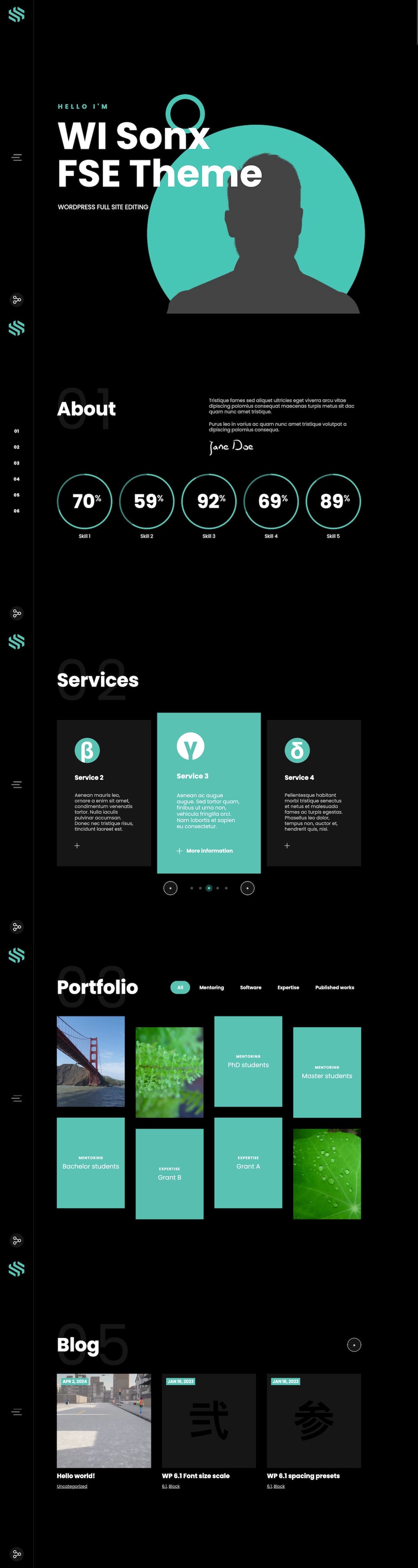
Introduction
- Objective: Build a modular, maintainable personal portfolio for a Machine Learning researcher.
- Scope: Full Site Editing (FSE) WordPress theme + custom plugins, integrated into a single repository with CI/CD.
- Design: Based on a pre-purchased template, adapted for academic/technical use.
Strategic Goals
When approaching this project, the guiding principle was simple: don’t build a Frankenstein. Too many WordPress projects end up as stitched‑together themes, half‑working plugins, and a pile of overrides that nobody wants to maintain. The goal here was to do the opposite: create a lean, modular, and future‑proof system that could serve as a personal portfolio while also being a reference implementation of modern WordPress practices.
- Modularity: Theme and plugins in separate repos; orchestration repository with Composer + CI/CD.
- Maintainability: Packagist distribution, automated deployments.
- Editor Experience: Deep Gutenberg integration with custom blocks and Interactivity API.
- Accessibility & Academic Context: Focus on accessibility, academic profile links.
- Developer Workflow: WP‑CLI, Docker, and GitHub Actions for reproducibility and automation.
Architecture Overview
The architecture follows a hub‑and‑spoke model:
- Spokes: Independent repositories for the theme and plugins.
- Hub: A private orchestration repository with Composer, GitHub Actions, and Docker Compose.
Core Theme
- WI Sonx FSE Theme
- Full Site Editing (FSE) theme;
- custom Gutenberg blocks;
- ready-to-use patterns and templates;
- distributed via Packagist for Composer‑based installation.
Supporting Plugins
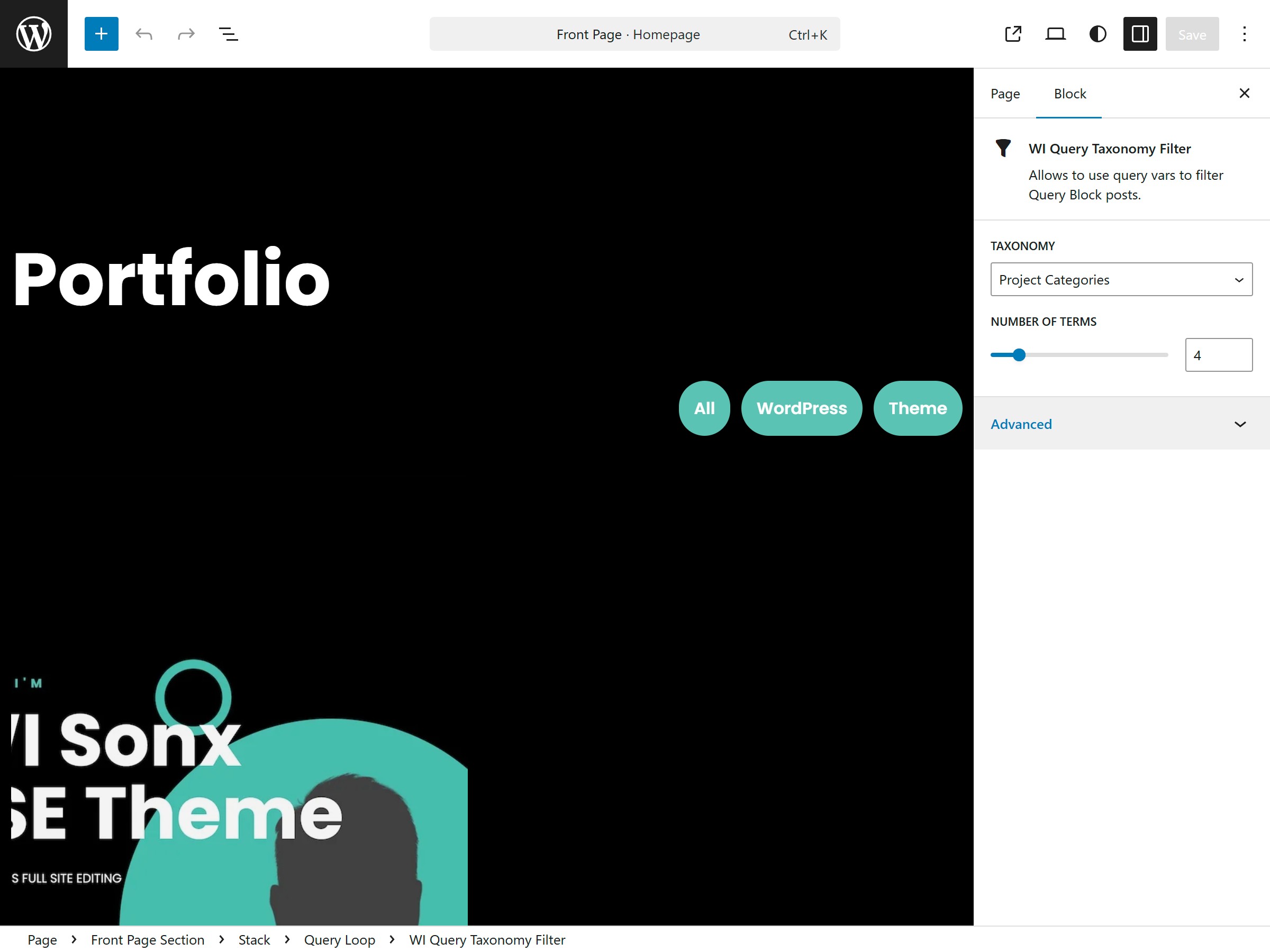
- wi-query-tax-filter – taxonomy filtering for Query block.
- wi-post-type-project – custom post type for projects.
- wi-post-type-service – custom post type for services.
- wi-collapsible-social-links – collapsible wrapper for social links.
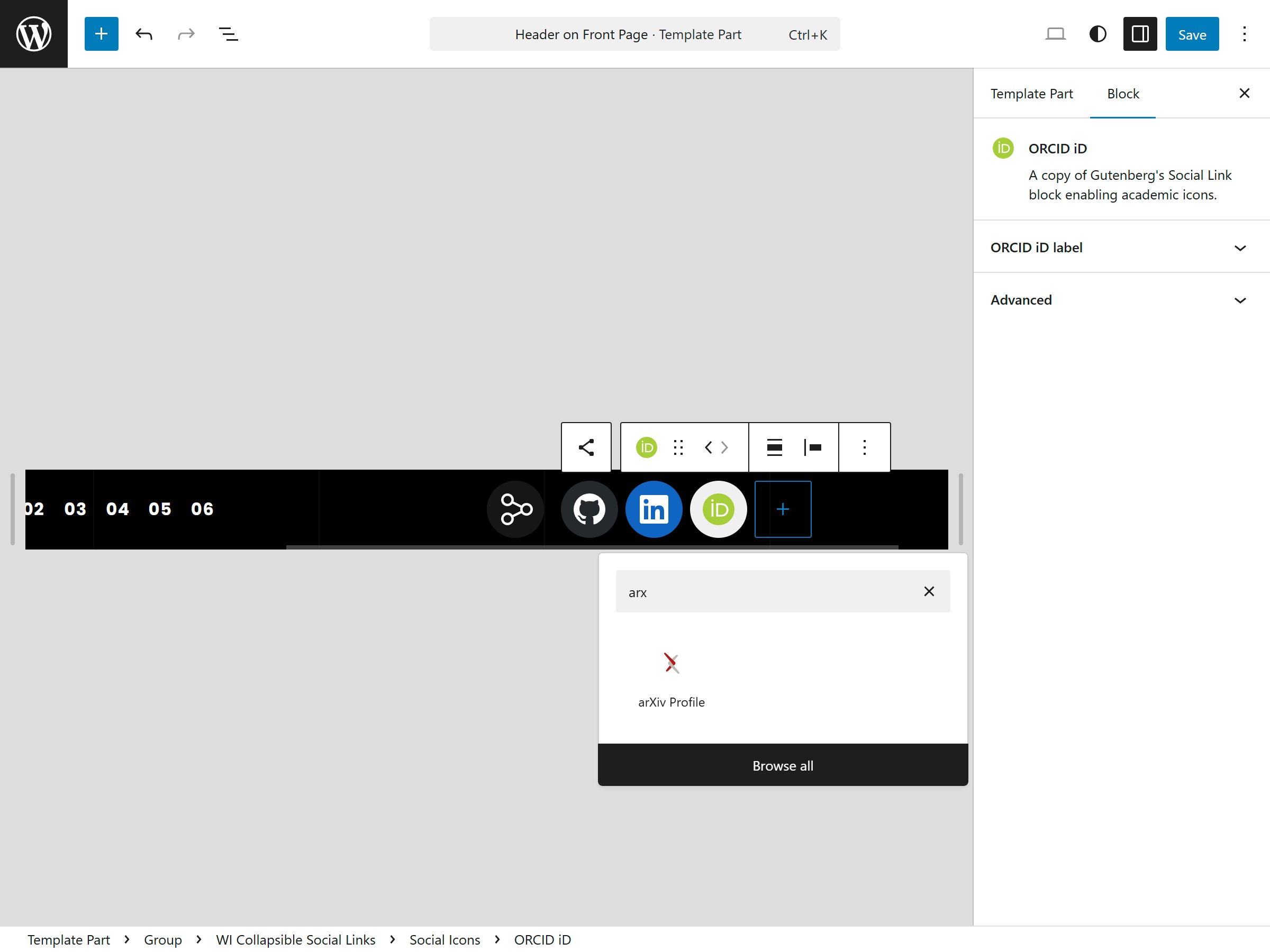
- wi-academic-social-link – academic profiles (ORCiD, arXiv).
Orchestration Repository
- Main files are
composer.json,.github/workflows/deploy.yml, anddocker-compose.yml. - Provides reproducible local environment (MySQL, WordPress, CLI container with WP‑CLI + Composer).
- Acts as the glue between repos and the basis for deployment.
Development Workflow
Local Development
To make the system approachable for both new contributors and seasoned developers, the local workflow was designed around a reproducible containerized environment. Each component plays a distinct role in ensuring consistency and speed.
-
Services. The orchestration repository includes a
docker-compose.ymlfile that spins up three main containers:- MySQL database (
mysql:8.3) - WordPress (
wordpress:6.8.3-php8.4) withwp-contentmounted as a volume for live development. - CLI/Dev, based on
mcr.microsoft.com/devcontainers/php:1-8.4-bookworm, extended with a custom Dockerfile. Includes WP‑CLI and Composer. Doubles as the development container for running commands, installing dependencies, and managing the environment.
- MySQL database (
-
Development‑only plugins. A set of helper plugins are installed in the local environment to speed up testing and debugging.
-
Standard WP testing content. For ease of use, developers can import the official WordPress test content, so the site never starts empty. This makes it easier to validate layouts, blocks, and custom post types immediately.
-
Theme/plugins development. Theme and plugins can be edited directly from CLI/Dev container if bind-mounted or developed in isolation.
Dependency Management
Beyond the local setup, dependency management was treated as a first‑class concern. Composer became the backbone for orchestrating updates and ensuring that theme and plugin versions remain in sync.
- Composer orchestrates theme/plugins as dependencies.
- Clear versioning and easy updates.
CI/CD Pipeline
Once local development was stable, the next challenge was deployment. A lightweight CI/CD pipeline was introduced to automate repetitive steps and reduce the risk of human error.
- GitHub Actions: checkout, Composer install, deploy via FTP (hosting limitation).
- Secrets stored securely.
Developer Experience
The result of these choices is a workflow that prioritizes speed and clarity, allowing developers to focus on building features rather than wrestling with setup.
- Fast onboarding (
docker-compose up). - Automated deployments reduce human error.
Gutenberg Integration
The Gutenberg editor was not treated as an obstacle to work around, but as the core editing experience to build upon. The project leaned into Full Site Editing (FSE) and the Interactivity API to deliver a portfolio site that is both developer‑friendly and editor‑friendly.
Reusable Custom Blocks (Plugin‑based)
Some custom blocks were developed with reusability in mind, ensuring that functionality could extend beyond this single portfolio:
- Collapsible Social Links Block – Wraps the native Social Links block, adding collapsible behavior for accessibility and cleaner layouts.
- Academic Social Link Block – Fork of the native Social Link block, extended to support academic platforms like ORCiD and arXiv.
Theme‑Specific Custom Blocks
Some functionality, however, was tightly coupled to the site’s design language. These blocks were bundled directly into the theme to preserve cohesion:
- Skill Percentage – A simple “skill gauge” represented as a donut chart, useful for showcasing expertise levels.
- Services Slider – A wrapper around the Post Template block, turning it into a lightweight slider for service offerings.
- Icon – A theme‑specific icon block (
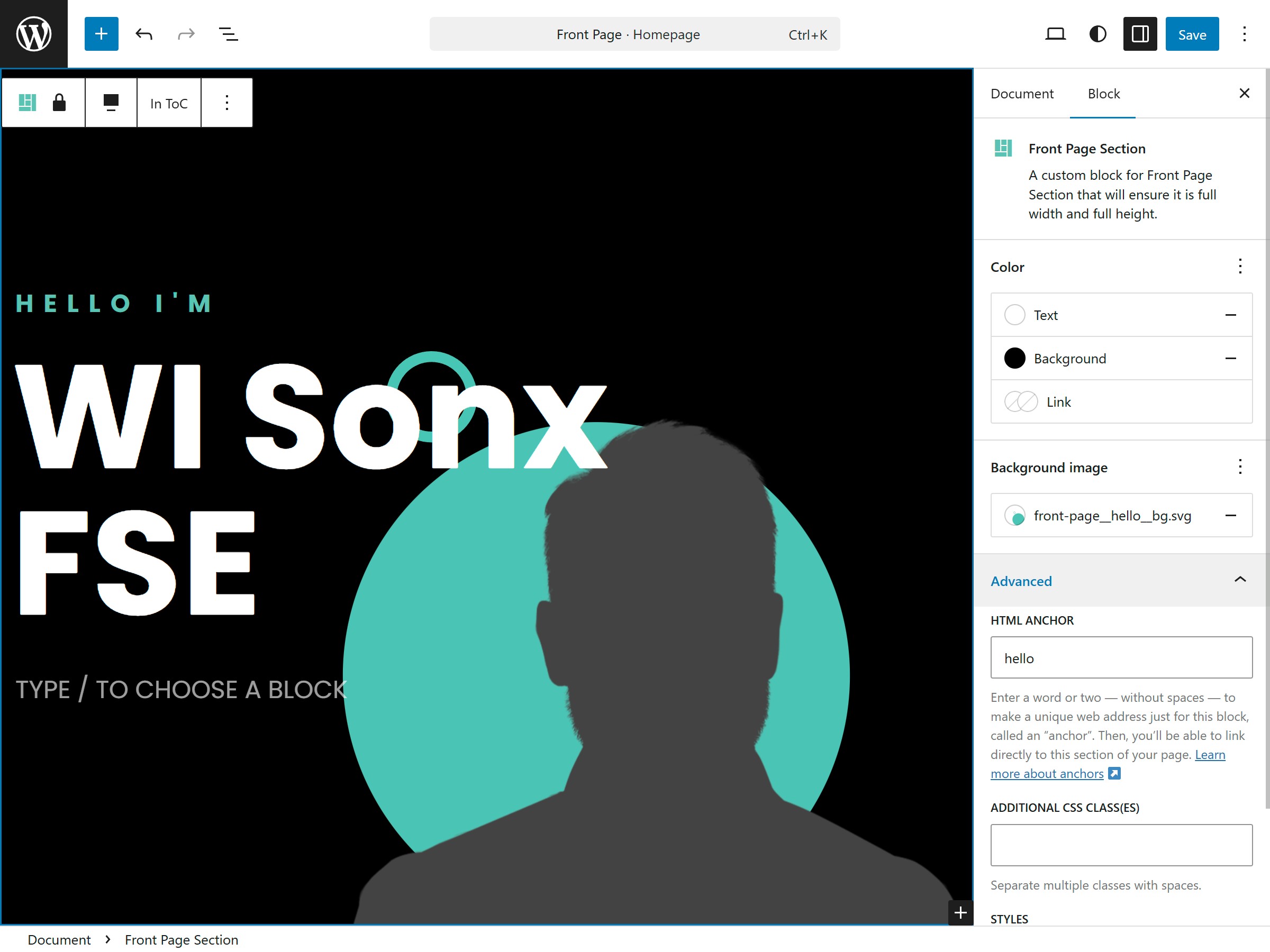
wi-sonx-fse/iconscategory) for consistent visual language. - Front Page ToC – Automatically generates a table of contents from Front Page Sections, improving navigation.
- Front Page Section – Ensures full‑width, full‑height layout for hero‑style sections on the homepage.
Interactivity API
Rather than pulling in heavy frameworks, the Interactivity API provided a native, lightweight way to add interactivity.
- No external JS frameworks. All dynamic behavior (collapsible menus, filters, sliders) was implemented using the WordPress Interactivity API or Vanilla JS libraries.
- Benefits:
- Lightweight: no React/Vue overhead.
- Native: integrates seamlessly with Gutenberg’s block system.
- Maintainable: avoids dependency sprawl.
- Example use case:
- The taxonomy filter plugin (
wi-query-tax-filter) extends the native Query block with client‑side interactivity powered by the Interactivity API.
- The taxonomy filter plugin (
import { getBlockDefaultClassName } from '@wordpress/blocks';
import { useBlockProps, useInnerBlocksProps } from '@wordpress/block-editor';
import { __ } from '@wordpress/i18n';
import classnames from 'classnames';

import metadata from './block.json';
import icons from './icons';

export default function save({ attributes }) {
  const defaultClassName = getBlockDefaultClassName(metadata.name);
  const { horizontalBreakpoint, size, buttonLabel, buttonIcon, anchor } =
    attributes;
  const ButtonIconComponent = icons[buttonIcon];

  return (
    <div
      {...useBlockProps.save({
        className: classnames(horizontalBreakpoint, size),
      })}
      data-wp-interactive="WICollapsibleSocialLinks"
      data-wp-context='{ "isOpen": false }'
    >
      <button
        className={`${defaultClassName}__button`}
        data-wp-on--click="actions.toggle"
        data-wp-bind--aria-expanded="context.isOpen"
        aria-controls={`${anchor}-content`}
      >
        <ButtonIconComponent
          className={`${defaultClassName}__button-icon`}
        />
        <span
          className={`${defaultClassName}__button-label screen-reader-text`}
        >
          {buttonLabel ||
            __('Social Links', 'wi-collapsible-social-links')}
        </span>
      </button>
      <nav
        {...useInnerBlocksProps.save({
          className: `${defaultClassName}__content`,
        })}
        id={`${anchor}-content`}
        data-wp-bind--hidden="!context.isOpen"
      />
    </div>
  );
}
Editor Experience
All of these technical decisions ultimately circle back to the editor. The goal was to make content creation intuitive, predictable, and enjoyable.
- Block‑first design. Every piece of content is represented as a block, making it intuitive for non‑technical users to edit.
- Live previews. Custom blocks provide accurate previews inside the editor, reducing the gap between editing and published view.
- Minimal configuration. Defaults are sensible, so editors don’t need to tweak settings endlessly.
Accessibility Considerations
- Collapsible navigation and social links implemented with semantic HTML and ARIA attributes.
- Keyboard navigation supported across custom blocks.
- Outcome: Accessibility is not an afterthought but baked into the block design.
Why Gutenberg Matters Here
- For developers:
- Blocks are modular, testable, and reusable.
- Interactivity API reduces reliance on external JS frameworks.
- For editors:
- Editing feels natural, with minimal training required.
- The site remains flexible and future‑proof as Gutenberg evolves.
Accessibility & Academic Features
Accessibility by Design
Accessibility was not bolted on at the end but considered from the start. Each block and interaction was evaluated for inclusivity and compliance.
- Semantic HTML,
- ARIA roles,
- keyboard navigation,
- WCAG‑compliant styles.
Academic Profile Integration
- Academic Social Link block for ORCiD, arXiv.
Outcomes & Lessons Learned
Outcomes
- Functional, editor‑friendly portfolio site.
- Reusable theme/plugins.
- Streamlined developer workflow.
- Improved accessibility.
- Academic credibility.
Lessons Learned
- Lean orchestration repository works best.
- Interactivity API simplifies stack.
- Accessibility is easier when built in early.
- Academic features add credibility.
- CI/CD modernizes WordPress workflows.
Reflections
The project demonstrates that WordPress can be modular, modern, and developer‑friendly when approached with a systems mindset. The result is both a working portfolio and a blueprint for academic/technical professionals.
Future Work
While the current implementation is stable and feature‑rich, there are clear opportunities for growth that would extend its reach and impact. Expanding academic integrations (ORCiD, Google Scholar, Semantic Scholar) would strengthen credibility across research platforms.